What is WeChat Pay?
WeChat (Weixin) is a popular social app in China, and WeChat Pay is its built-in payment service.
WeChat Pay is one of the most widely used payment methods in China. From modern cities to remote villages, from high-end restaurants to street food vendors, from online shopping to in-store purchases, WeChat Pay is accepted almost everywhere. You can use it to pay for transportation, food delivery, tickets, and virtually any service or product in China.
This guide focuses specifically on setting up WeChat Pay rather than registering a new WeChat account.
How to download WeChat
You can download WeChat from the App Store or Google Play Store.

WeChat is a popular social app in China.
Download the WeChat app and tap "Sign Up" to register with your phone number.

Where to find WeChat Pay
Tap "Me" -> "Services" -> "Wallet".
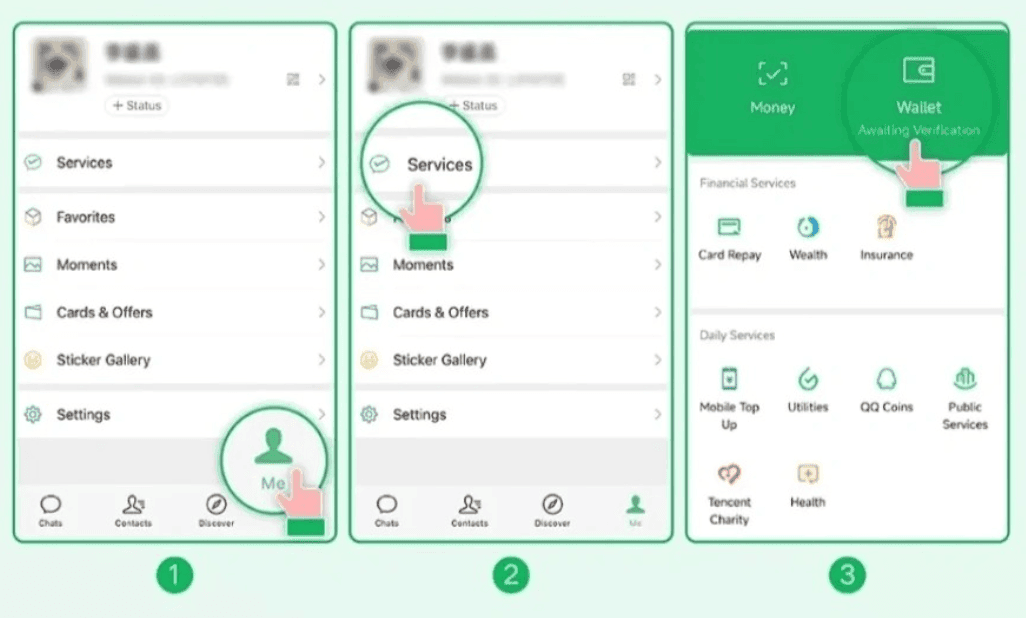
WeChat Pay supports major international payment cards including:
- Visa
- Mastercard
- Diners Club
- Discover
- JCB
If you do not see the options above, you can enable WeChat Pay manually:
Go to "Me" -> "Settings" -> "General" -> "Tools" -> "Weixin Pay", then tap "Enable".
Identity Verification
In Wallet, tap "Add a Card". Read the WeChat Pay User Service Agreement and Privacy Policy, then tap "Agree".
Follow the on-screen prompts to fill in your identity information, then tap "Next" to add your card.
Follow the remaining instructions to complete the process.
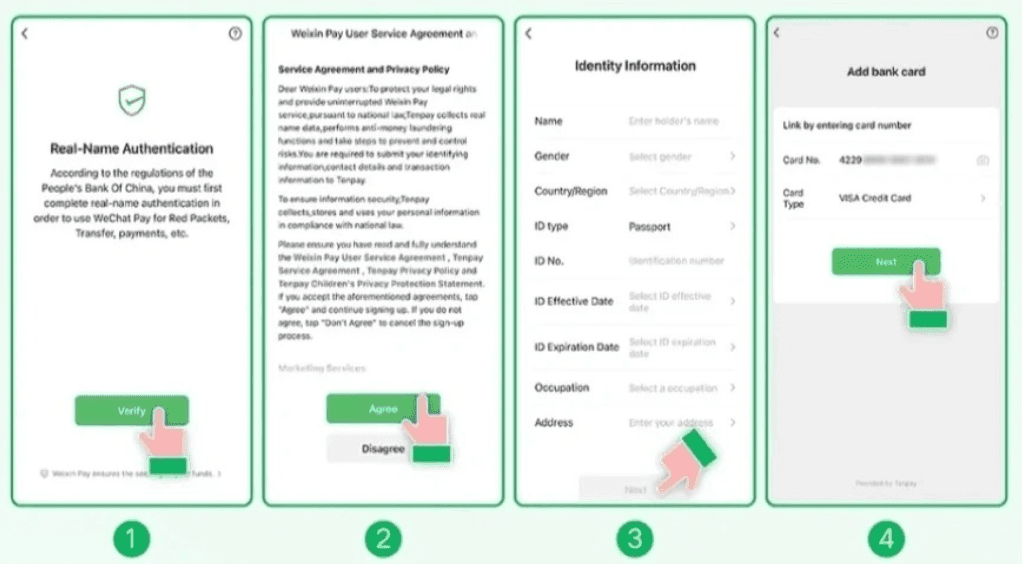
Tip: When verifying your identity with a passport, select "Passport" as the ID type. You will then be prompted to upload a clear photo of your passport's information page.
Fees
For payments funded by a linked international card, Weixin Pay generally waives its service fee for a single transaction of ¥200 or less and charges 3% when a single transaction exceeds ¥200. In May 2026, Tencent announced a 90-day fee waiver for first-time users linking an international card, covering eligible spending up to ¥1,000 per day. Promotions and limits can change, so use the fee displayed at checkout as the final amount. Your card issuer may separately charge foreign-exchange or international transaction fees.
How to use WeChat Pay for payment
You can pay either by scanning the merchant's QR code or by presenting your own payment code to be scanned.
How to scan a QR code to pay
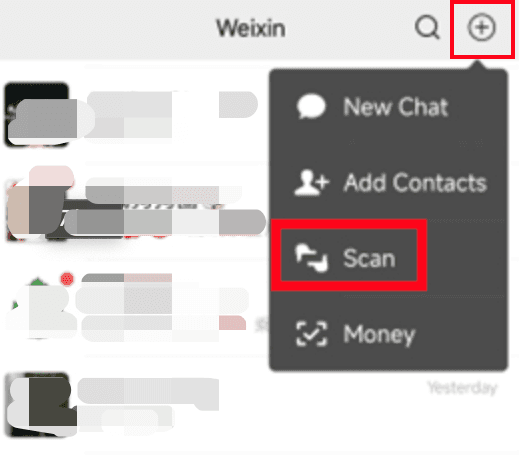
When paying a merchant displaying a QR code, open WeChat, tap "+" in the top right corner -> "Scan", and scan the QR code provided by the merchant.
How to present your QR code to the merchant and pay
Some stores scan the customer's payment code instead. In this case, present your WeChat Pay payment code for the merchant to scan.
To open your payment code, open WeChat and tap "+" in the top right corner -> "Money".
If weak mobile signal prevents you from scanning the merchant's code, showing your own payment code often works offline; the merchant scans it, and your receipt notification will arrive once connectivity is restored.